Architecture
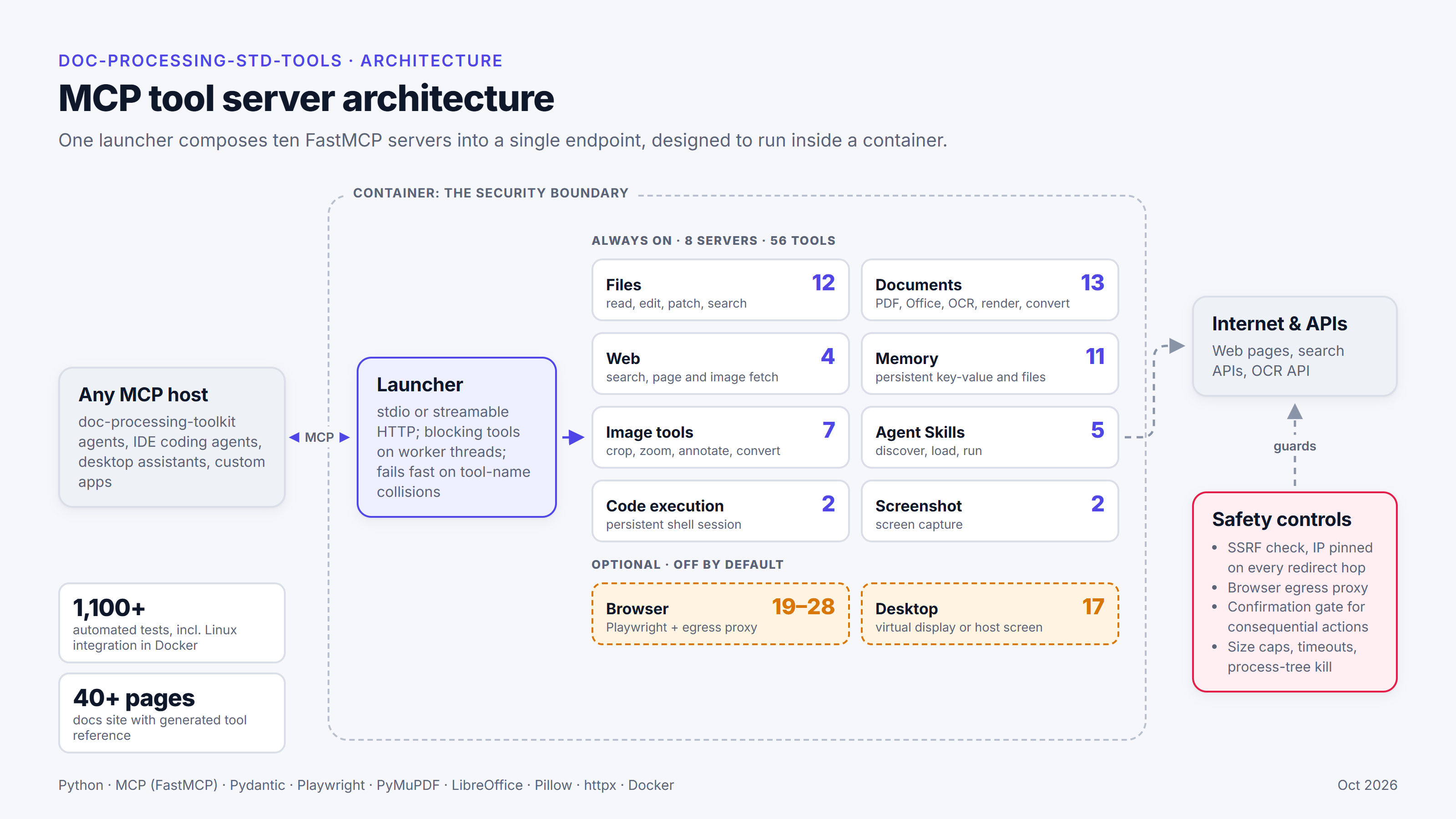
One FastMCP server per module
Each server is a FastMCP instance defined in its own module of doc_processing_std_tools. A tool is
a plain Python function registered on that server — synchronous for the eight always-on servers,
async for the browser and computer servers.
| Module | Server object | MCP server name | Tools |
|---|---|---|---|
file_system |
file_system_server |
file-system-tools |
12 |
web_search |
web_search_server |
web-search-tools |
4 |
memory |
memory_server |
memory-tools |
11 |
document_processing |
document_processing_server |
document-processing-tools |
13 |
code_execution |
code_execution_server |
code-execution-tools |
2 |
screenshot |
screenshot_server |
screenshot-tools |
2 |
image_tools |
image_tools_server |
image-tools |
7 |
skills |
skills_server (and make_skills_server()) |
skills-tools |
5 |
browser (optional) |
browser_server (and make_browser_server()) |
browser-tools |
19 (core) or 28 (full): 18 or 27 browser_* tools plus fetch_webpage_rendered, and opt-ins |
computer (optional) |
computer_server (and make_computer_server()) |
computer-tools |
17 |
Three conventions hold across every server:
- The docstring is the tool description. FastMCP sends a tool's docstring to the model as its description, and builds the parameter schema from the type hints. Changing a docstring changes what the model reads when it chooses a tool. The Tool Reference shows that text, formatted for reading, with the exact text in a collapsed block under each tool.
- Errors are returned, not raised. Tools report failures as a string beginning with
Error:— a missing file, a bad argument, a missing optional library — so the model can read it and recover. Messages never include API keys, and network errors never echo the URL or IP. - Optional dependencies are imported lazily. A tool imports its library (pdfplumber, httpx, mss, Pillow, …) when it runs. If the library is missing, the tool returns an error naming the extra to install; the server still imports and its other tools still work.
The package itself imports lazily too (PEP 562): from doc_processing_std_tools import
document_processing_server imports only that module, so an install with only the docs extra
never fails because of another server's missing dependency.
Two ways to run the servers
In-process
Import the server objects and pass them to the toolkit's Agent:
from doc_processing_toolkit import Agent
from doc_processing_std_tools import file_system_server, memory_server

agent = Agent(model="claude-sonnet-5", tools=[file_system_server, memory_server])
The toolkit calls the tool functions inside your application's process. There is no subprocess and
no transport. See the toolkit's Tools
and MCP pages for the formats an Agent
accepts.
Out-of-process: the composed launcher
python -m doc_processing_std_tools builds one parent server, FastMCP("doc-processing-std-tools"),
and runs it over stdio (the default) or streamable HTTP:
python -m doc_processing_std_tools
python -m doc_processing_std_tools --transport http --host 127.0.0.1 --port 8000
How it composes (compose_servers() in __main__.py):
- Every tool of every sub-server is re-registered on the parent with the same function, name,
description and annotations, so a tool behaves identically through either route. The
mcpSDK has no public composition API, so this reads each server's registered tools through a private FastMCP attribute — the reasonmcpis pinned below 2 (Compatibility). - Tool names are not prefixed. If two sub-servers ever registered the same name, the launcher
would stop at start-up with a
RuntimeErrornaming both, rather than let one shadow the other. - Tools that return images keep their unstructured output setting, so image results pass through unchanged.
- Blocking tools run on worker threads (new in 0.6.0). Every tool is a synchronous function,
and FastMCP would call it on its event loop, so one slow call would freeze every other request and
the transport itself. The launcher therefore registers each synchronous tool as an
asyncwrapper that runs it on a worker thread (anyio.to_thread.run_sync). Names, descriptions and schemas are unchanged; a unit test checks this. - The browser server is optional (new in 0.6.0). It is composed only when
DPTTOOLS_ENABLE_BROWSER=true, and itsDPTTOOLS_BROWSER_*settings are validated only then, so a bad browser setting cannot stop the other servers. Its tools areasyncand run on the browser's own runtime thread, so they are registered as they are. - The computer server is optional too (new in 0.6.0). It is composed only when
DPTTOOLS_ENABLE_COMPUTER=true, and itsDPTTOOLS_COMPUTER_*settings are validated only then. Its tools areasync(they move blocking work to a thread themselves), so they are also registered as they are. With both optional servers the launcher has 92 tools (corebrowser profile) or 101 (full). - Before serving, the launcher validates the configuration and exits with a message naming any invalid variable.
The HTTP transport has no authentication
--transport http binds to 127.0.0.1 by default. The server does not authenticate callers, so
bind another interface (--host 0.0.0.0) only behind an authenticating proxy or a network policy
that limits who can reach it.
Each sub-server can also run alone over stdio, for example
python -m doc_processing_std_tools.document_processing. A sub-server run this way skips the
launcher's start-up validation; a bad setting surfaces as an Error: from the first tool that reads
it.
Which to choose
| In-process | Composed launcher (stdio or HTTP) | |
|---|---|---|
| Where tools run | Your application's process | A separate process |
| Configuration | Your process's environment | The launched process's environment — see Configuration |
Image results (read_image, renderers, screenshots) |
Need toolkit 0.5.1 or later | Work with any toolkit version |
| Clients | One Agent |
Any MCP client; several can share one HTTP server |
| Shared state | Per process (for example, the shell session's working directory) | Shared by every client of that server process |
Concurrency
Because the composed server runs tools on worker threads, calls from one or several clients can overlap. What that means:
- A slow tool no longer blocks the others. An OCR job (up to 10 minutes), a LibreOffice
conversion (up to 2 minutes), a long
execute_commandor a slow page fetch runs while other calls proceed. - File changes are locked. Every tool in the File System and Memory servers that changes a file (writes, creates, edits, patches, deletes, moves, copies, renames) holds its server's lock from its checks to the end of the change. Overlapping calls therefore behave as if they ran one after the other: no lost edits, no interleaved overwrites, and a deleted file is not written back. The lock is per server process, not across processes.
- The shell session is serialised.
execute_commandandrestart_sessionshare one session per process and take turns. - A started call runs to the end. A worker thread cannot be interrupted, so if a client cancels a call, the tool keeps running until it finishes or reaches its own timeout.
Each sub-server run on its own (python -m doc_processing_std_tools.<module>) does not use worker
threads: FastMCP runs its tools one at a time on the event loop. In-process, the agent decides how
tools are called; see Using with the Toolkit.
Configuration
Everything is configured through environment variables; the Configuration page lists every one, generated from the table in the code. In short:
- std-tools reads the process environment only. It never loads a
.envfile itself; load one in whatever starts std-tools (docker run --env-file .env,env_file:in Docker Compose, or your application's ownload_dotenv()). - Values are read once per process, on first use, and cached — except
LLMWHISPERER_API_KEY, which is read on every OCR call. Restart the process after changing one. - A numeric variable that is not a positive integer is an error naming the variable. The composed launcher refuses to start; other entry points fail on the first tool call that reads it.
DPTTOOLS_MEMORY_DIRandDPTTOOLS_SKILLS_DIRare resolved to absolute paths at that first read, relative to the process's working directory at the time.
Stdio servers started by a client get a minimal environment
When an MCP client launches a stdio server, the MCP Python SDK passes the child only a short list
of safe variables (PATH, HOME and a few others) unless the client supplies an explicit env.
Pass every DPTTOOLS_* variable and API key you use in env. The toolkit's mcp_command and
mcp_script configs pass none (toolkit 0.5.2 and earlier), so open the session yourself; see
Using with the Toolkit.
Security posture
std-tools is designed to run inside an isolated container that the client application controls. The container is the security boundary: its mounts, network settings and resource limits decide what the agent can reach.
What that means in practice:
- File paths are not confined. The file, document and image tools accept relative paths with
..and absolute paths, because moving around the sandbox is legitimate.sanitize_pathonly rejects an embedded NUL byte. Anything the process can read, the agent can read. - Commands are not filtered.
execute_commandruns whatever the model sends, as the server's user. It uses a subprocess — neverevalorexec— with a timeout that kills the whole process tree.
Defence in depth that is always on:
| Measure | Where |
|---|---|
File-size limit before reading (DPTTOOLS_MAX_FILE_SIZE_MB) |
read_file, search_in_files, document, image and skill-resource reads |
Output truncation (DPTTOOLS_OUTPUT_TRUNCATION_LIMIT) |
File and document text, command and script output, skills |
| Timeouts | execute_command (kills the whole process tree), execute_skill_script, LibreOffice conversion, OCR |
| SSRF protection: non-public addresses refused unless allow-listed, every redirect re-checked, the connection pinned to the validated IP | fetch_webpage, fetch_image |
| Real path containment | The Memory tools (inside DPTTOOLS_MEMORY_DIR) and the Skills tools (inside DPTTOOLS_SKILLS_DIR) |
| A pixel cap against decompression bombs (about 256 million pixels) | Image Tools |
Secrets kept out of results: errors have request URLs and API keys removed; the search key is excluded from repr |
web_search, OCR, configuration |
A typical production container (adapt the mounts to your application):
docker run --rm \
  -v /host/project:/workspace:rw \
  -v /host/memory:/workspace/.memory:rw \
  -v /host/skills:/workspace/.agent_skills:ro \
  --memory=2g --cpus=2 \
  -e DPTTOOLS_MEMORY_DIR=/workspace/.memory \
  -e DPTTOOLS_SKILLS_DIR=/workspace/.agent_skills \
  -e DPTTOOLS_WEB_SEARCH_PROVIDER=tavily \
  -e DPTTOOLS_WEB_SEARCH_API_KEY=tvly-xxx \
  my-agent-image python run_agent.py
- Run as a non-root user.
- Mount read-only whatever the agent should not change (here, the skills directory).
- Add
--network=nonewhen the agent needs no network. The Web server and OCR need outbound access, so leave it off if you use them.
The browser and computer servers bring their own safety layers — for the browser, an egress proxy with IP pinning and domain lists; for the desktop, a separate virtual display per session, and a kill switch and a pause on human activity in host mode; for both, a confirmation gate that is off by default — and a split of responsibilities between std-tools and the client application. The Security guide covers them.
Optional extras
| Extra | Packages | Servers or tools |
|---|---|---|
| (base) | mcp>=1.25,<2, pydantic, pyyaml |
File System, Memory, Code Execution, Skills |
docs |
pdfplumber, python-pptx, openpyxl, python-docx, Pillow, pymupdf | Documents (readers and renderers), Image Tools |
ocr |
llmwhisperer-client>=2,<3 |
ocr_pdf, ocr_image |
web |
httpx>=0.27, Pillow |
Web (Pillow for fetch_image) |
extract |
trafilatura>=2.0 |
Optional: main-content extraction in fetch_webpage |
screenshot |
mss, Pillow |
Screenshot |
browser |
playwright>=1.49,<2, Pillow |
Browser (plus playwright install chromium) |
computer |
mss, Pillow, pynput (not on Linux) |
Computer (the virtual backend also needs Xvfb, xdotool and a window manager) |
all |
docs, ocr, web, extract, screenshot, browser, computer |
Everything |
std-tools deliberately does not depend on doc-processing-toolkit: OCR talks to LLMWhisperer
directly, and the servers work with any MCP host.